Find leads
Find leads shows your ideal customer on the left and, under Best fit, the people who match it on the right. Browsing the list is free. Getting someone’s email and phone uses one of your plan’s leads. Find leads is for owners and admins; members don’t see it.
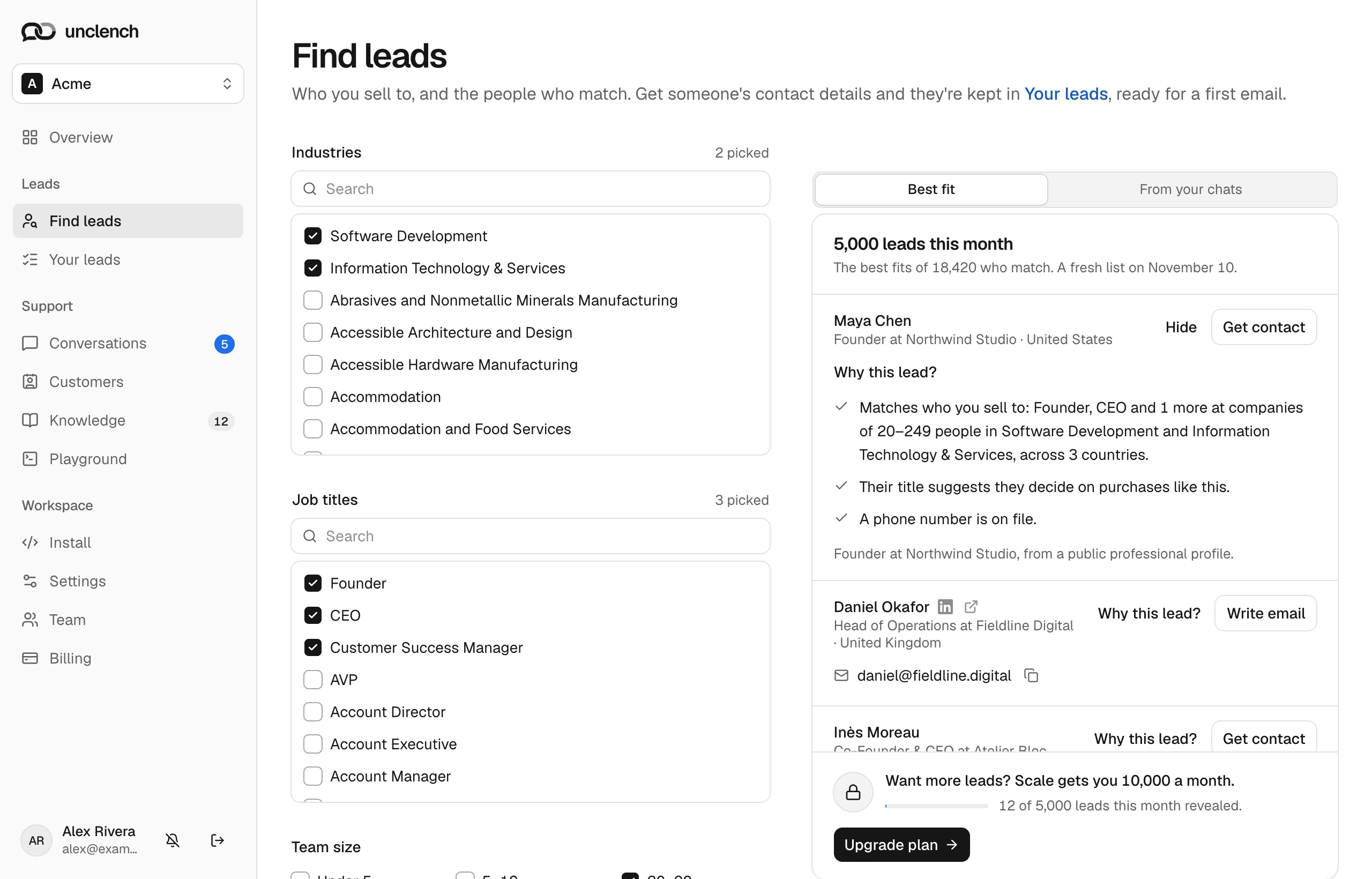
Your ideal customer
During setup we read your website and propose who buys from you on Are these the customers you’re looking for?: Industry, Company size, Who decides and Where when you sell to companies; Who, Words they use, Company size and Where when you sell to people. Why we think so shows what each row rests on, and a row your pages don’t support is marked as a guess. Choose Edit on any row, then Looks right, find leads. No website? Choose Upload documents instead.
You can change it any time on the left of Find leads. Changes save on their own a moment after you stop editing, and the list updates to match.
| Filter | What it does |
|---|---|
| Industries | The industries the company is in. |
| Job titles | The roles you want to reach, like Founder or Head of Support. Founder also finds “Co-Founder & CEO”. |
| Team size | How many people work at the company. |
| Yearly revenue | The company’s revenue. |
| Countries | Where the person is based. |
Each filter takes up to 15 values. Fewer filters give a bigger list.
If you sell to individuals, creators or small shops, choose Use people and community filters: Words their profile uses (be specific: “wedding photography”, not “photography”), Who to reach, Countries and Team size. Use business filters switches back.
Changing your ideal customer starts a new list for the period. You can do that up to 10 times during your trial and 50 times each billing period on a plan. Past that, the last list stays until the next period.
Your list
The list holds as many people as your plan includes a month (25 during your trial), picked from everyone who matches, for example 300 leads this month. The best fits of 4,120 who match. It stays the same for your whole billing period, and each new period brings people you haven’t been shown before. Choose Show more to load the next 50.
People most likely to decide on a purchase come first: founders, owners and C-level titles, then heads, VPs and directors, then managers. An exact job title match and a phone number on file move someone up. Choose Why this lead? on a row to see the reasons.
Before you reveal someone, the row shows their name, title, company and country.
Get someone’s contact details
Choose Get contact. We look up their email, then a phone number, and add them to Your leads with their LinkedIn profile and company website.
A lead counts towards your plan only when we find an email or a phone number. If we find neither, the row says No email or phone found. This one didn’t count toward your leads. Someone you’ve already revealed never costs anything again.
| Plan | Leads a month |
|---|---|
| Trial | 25 |
| Solo | 300 |
| Starter | 1,500 |
| Growth | 5,000 |
| Scale | 10,000 |
| Business | 20,000 |
Leads reset at the start of each billing period. Upgrade plan moves you to the next plan with more leads straight away. See Plans and billing.
From your chats
Switch from Best fit to From your chats to see visitors who asked your chat about pricing, plans, a trial or a demo in the last 90 days, left their email and haven’t signed up (the 30 most recent). Choose Add to your leads to keep one. This is free, because their email came from the chat. Visitors leave this list when they sign up; to tell us who has, identify signed-in users.
Without a plan
When your trial or plan ends, Find leads shows a lock instead of the list, and finding, revealing and writing emails pause until you choose a plan. Everyone you kept stays in Your leads.
If something goes wrong
- That lead is out of date. Refresh the list and try again. The list changed since you loaded it. Reload the page.
- Lead search didn’t answer just now. Try again in a moment. Our data provider didn’t respond. A failed lookup doesn’t count.
- Too many requests. Slow down a little. The list refreshes up to 30 times a minute as you edit filters, then picks up again a moment later.