Chat widget
Open Settings → Widget. Changes show in the preview on the right straight away, and reach your site as soon as you choose Save changes. You don’t need to touch the snippet again.
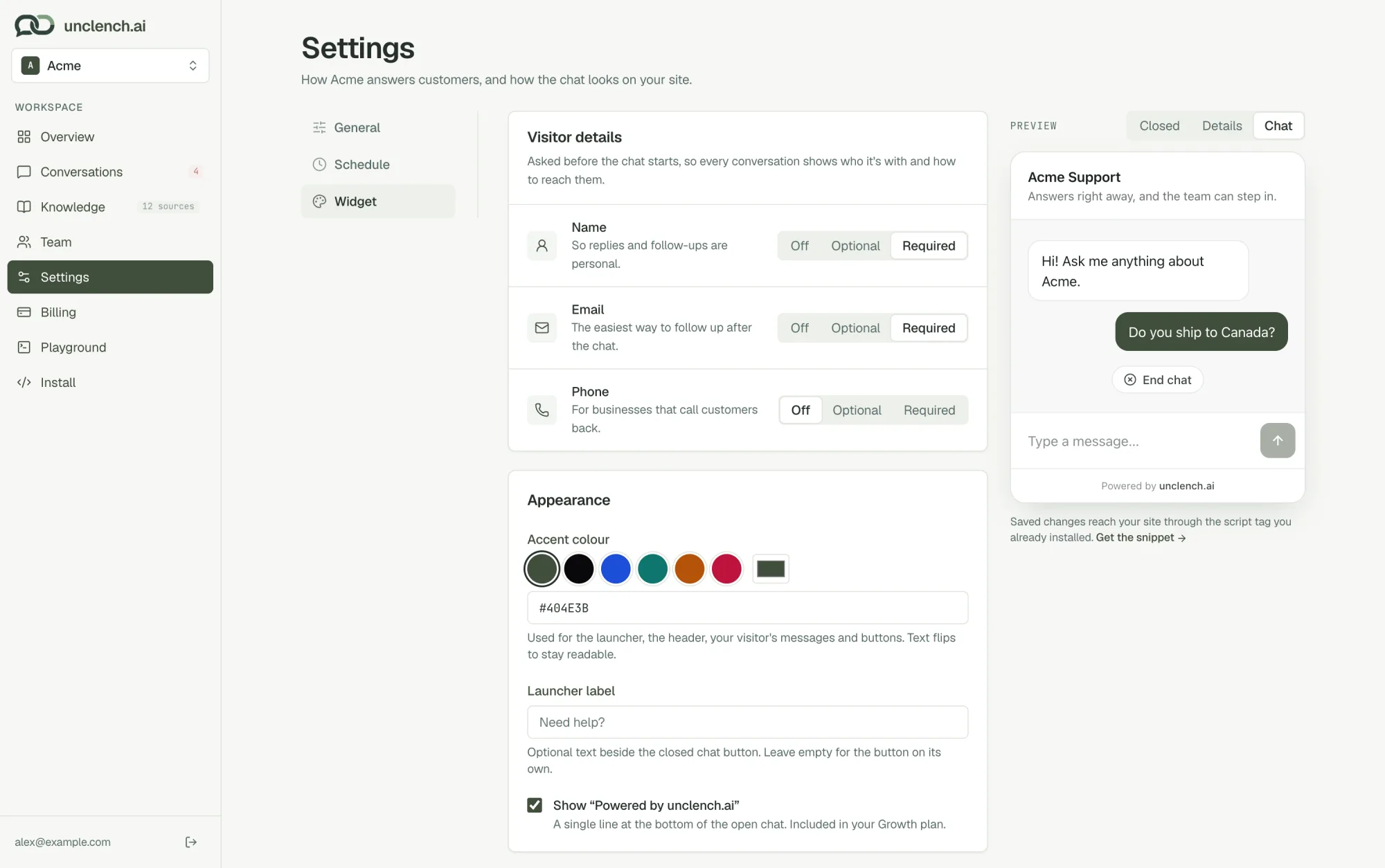
Visitor details
Choose what to ask visitors before the chat starts, so every conversation shows who it’s with and how to reach them. Each one can be Off, Optional or Required.
| Detail | Starts as | Why ask |
|---|---|---|
| Name | Required | So replies and follow-ups are personal. |
| Required | So your team can reply by email after they’ve left. | |
| Phone | Off | For businesses that call customers back. |
Visitors are only asked once. Their browser remembers the answers for the next chat.
Keep Email on if you want to answer people after they’ve left your site. Without it, you can only reply while they’re still there. See When customers leave.
Appearance
- Accent colour. Pick a preset or enter your own colour. It’s used for the chat button, the header, your visitor’s messages and buttons. Text on top of it switches between light and dark on its own, so it stays readable.
- Launcher label. Optional text next to the closed chat button, like “Need help?”. Leave it empty for just the button.
- Show “Powered by unclench.ai”. A single line at the bottom of the open chat. You can turn it off on the Growth plan.
Name and welcome message
The name at the top of the chat and the first message visitors see are set under Settings → General. See Your agent.
Preview
Use the switch above the preview to see the chat three ways:
- Closed: the chat button as it sits on your page, with the welcome message popping up beside it.
- Details: the “Before we start” form, if you ask for any visitor details.
- Chat: an open conversation.
What visitors see
- The chat button sits in the bottom-right corner. On phones the chat opens nearly full-screen.
- A few seconds after the page loads, the welcome message pops up next to the button, once per visit. It doesn’t show again once the visitor has chatted.
- Visitors can rate replies as helpful or not, ask for a person at any time, and end the chat when they’re done.