Team
Open Team to invite people and manage who can do what.
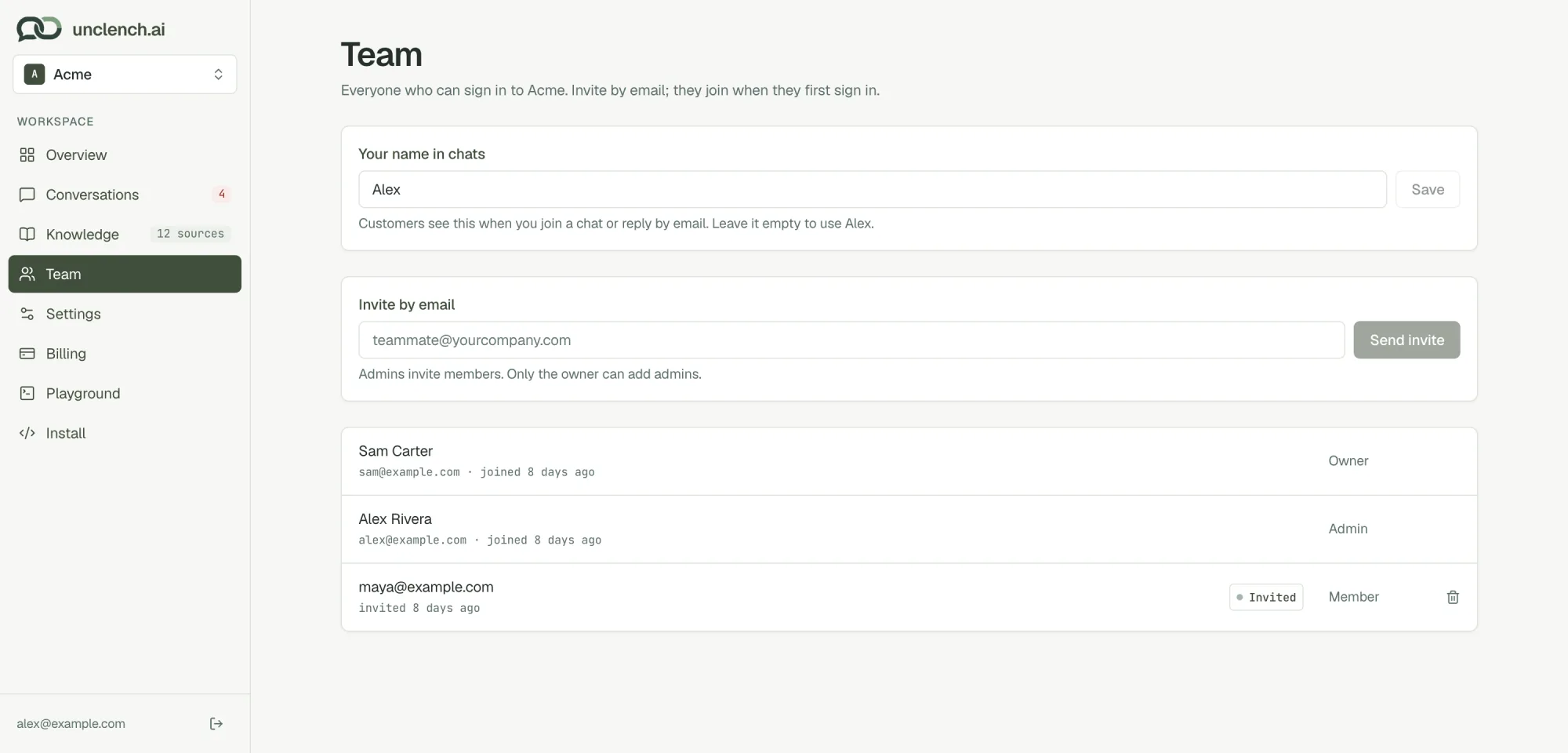
Invite a teammate
Type their email under Invite by email, pick a role and choose Send invite. They get an email and join the first time they sign in with Google using that address. Until then they show as Invited.
Pending invites count towards your seats.
Roles
| What they can do | Owner | Admin | Member |
|---|---|---|---|
| See the overview, conversations and team | ✓ | ✓ | ✓ |
| Answer customers and resolve chats | ✓ | ✓ | ✓ |
| Answer knowledge gaps from a chat | ✓ | ✓ | ✓ |
| Manage help content, settings, the widget and install | ✓ | ✓ | |
| Invite and remove members | ✓ | ✓ | |
| Invite and remove admins | ✓ | ||
| Change someone’s role | ✓ |
The person who created the workspace is the Owner. The owner can’t be removed. Billing is open to owners and admins.
Your name in chats
This is the name customers see when you join a chat or reply by email. Each person sets their own. Leave it empty to use your first name.
Seats
| Plan | Seats |
|---|---|
| Starter | 2 |
| Growth | 10 |
Running more than one business? Use the workspace switcher at the top of the sidebar and choose Create organization. Each one has its own agent, help content, conversations, team and plan.
Last updated on